The What of the Primary Source Cooperative
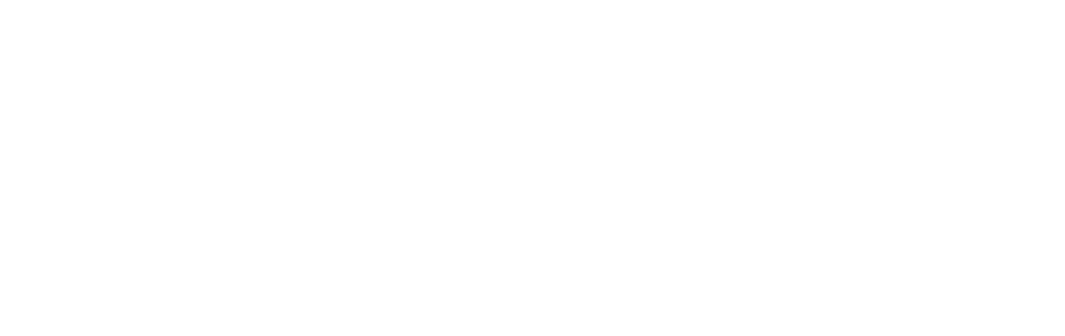
The heart of the Primary Source Cooperative is, foremost, the text of the historical documents, selected by editors for transcription, verification, and annotation—a process often referred to as documentary or scholarly editing. Within the Coop, each document follows a standardized production workflow—the “what” described below.
For insight regarding the purpose of the Coop as a documentary editing initiative, please see The Why of the Primary Source Cooperative.
For more information about documentary editing in general, see the website of the Association for Documentary Editing.
All editions publishing their work in the Coop share the same system, collaboratively developed to accomplish predictable online publication. While each edition establishes its own editorial policies and determines when documents are ready to be made public, all Coop editions depend on these mechanisms to support content development and create a reliable experience for the end user.
XML
Every document published on the Primary Source Cooperative website is based in XML (Extensible Markup Language), an electronic text format that “tags” the semantic and structural aspects of the text to aid regularized presentation, access, searching, and transformation. Because an XML document is plain text, the format is also excellent for preservation of the content, which improves sustainability for the project. An XML editor is required to create and edit XML files.
The Coop uses a custom schema, or a framework of rules, adapted from the guidelines of the Text Encoding Initiative, to confirm the validity of the tagging during production and before publication.
Microsoft Word and WET VAC
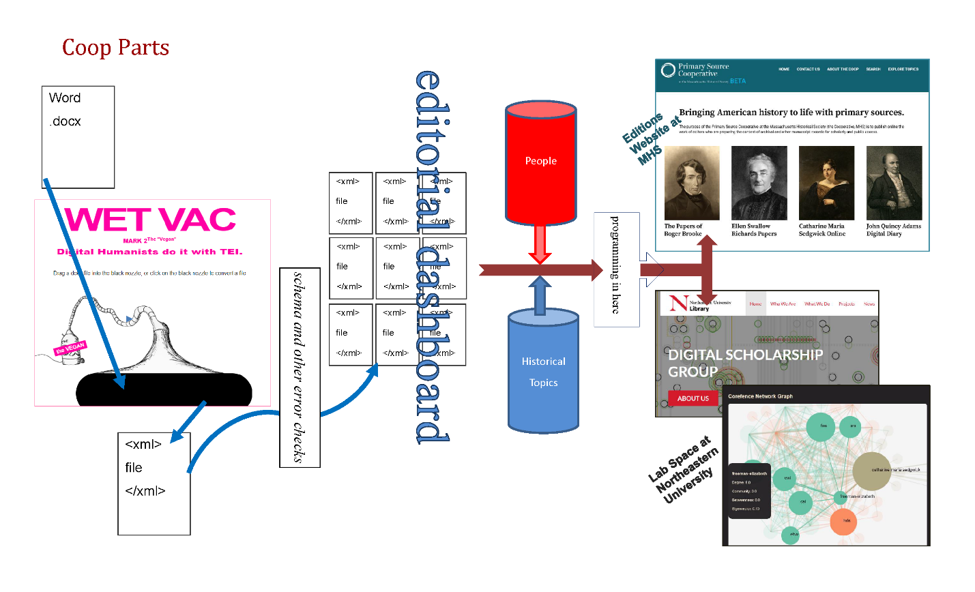
WET VAC is a tool that can generate an XML file from any Microsoft Word file (.docx) made using the Coop’s custom template. While the annotated transcriptions of all documents must be in XML before they can be published, the Coop has acknowledged from the start that editors on many documentary editing projects rely on word-processing programs such as Word. Since WET VAC lets transcribers choose between beginning their work directly in XML or starting with Word, it gives projects flexibility in their path to an XML-based environment.
To try a test run of WET VAC, see Take Our Tools.
Databases for People and Topics
All Coop editions participate in the editorial annotation of people and historical topics referenced within the historical text. As editors prepare transcriptions, they note textual references to historical figures and topics using specific XML markers, which are contained in the People and Subjects databases respectively. These are the keys to the Coop’s search capabilities with faceting on topics and historical names. The People database maintains entries for every individual identified in the historical texts, each person associated with a unique code. The Subjects database maintains entries for historical subject matter that the editors have agreed upon, including the precise wording of each term. The entries in both databases are determined by the editors collectively. The databases and their associated encoding within the documents allow end users to search with those delimiters in each edition or across all editions at once.
Content Management
The Coop has developed several tools to manage and display transcriptions. In the document manager, editors upload their XML files, add image files, and publish any document to the site as they deem appropriate. The document manager also allows for checking in/out, proof reading, and checking for metadata integrity before a file is published on the site. Once a file is uploaded, the references in each text connect to the People and Subjects databases, making these components searchable across all editions on the site.
WordPress provides a login interface for editors. Using its individual project management dashboard, each edition can upload contextual copy for its individual site within the Coop website and easily access the bespoke tools described above. The end result of these pieces is that a user can search directly by topic or name and find references in any text; browse topics; or click a person within a text to open a page with biographical information or find other mentions of them.
Primary Source Cooperative Server Software
For access to all software developed for the Coop content development and publication system, as well as the Coop website, see GitHub. For more information about the server software, including the possibility of implementing it for a new publication platform, please see our resources page or contact the MHS Coop team at primarysourcecoop@masshist.org.
Lab Space at the Digital Scholarship Group at Northeastern University
The Digital Scholarship Group at Northeastern University has developed a system that creates various complex visualizations from the content and metadata of the Coop XML files. For information about their work with the Coop, see The Lab Space at DSG.